When Does a Vending Operator Need a Custom Vending Solution?
The article highlights when vending businesses need custom software, key features to consider, investment factors, and how Vendigent simplifies machine monitoring, inventory, sales tracking, and daily operations.
Managing a vending business involves inventory tracking, machine monitoring, payments, and restocking across multiple locations. While standard vending management software handles these tasks, growing operational demands may require more flexibility.
A custom vending solution can help operators overcome software limitations, integrate different vending machines, automate workflows, and simplify daily operations.
But when is customization necessary?
In this guide, we'll explore eight signs your vending business may need a custom solution, compare standard and customized systems, and explain what to consider before investing.
What Is a Custom Vending Solution?
A custom vending solution is a software or hardware system designed to meet specific vending business needs. Unlike standard vending software, it offers greater flexibility for machine management, inventory tracking, payments, and reporting.
A custom solution may include:
- Software Customization: Adapting features to business requirements.
- Machine Integration: Connecting different vending machine models.
- Inventory Management: Supporting custom stock and restocking workflows.
- Payment Integration: Connecting payment gateways and business applications.
- Custom Interfaces: Creating branded vending machine experiences.
Customization doesn't always require building new software. Existing vending management platforms can often be configured or integrated to meet specific operational needs.
8 Signs a Vending Operator Needs a Custom Vending Solution
Every vending business operates differently. Some operators manage a few traditional machines, while others oversee large fleets, specialized products, and multiple business locations.
As operational requirements become more demanding, certain limitations may indicate that standard vending management software is no longer sufficient.
Here are eight signs that a custom vending solution may be worth considering.
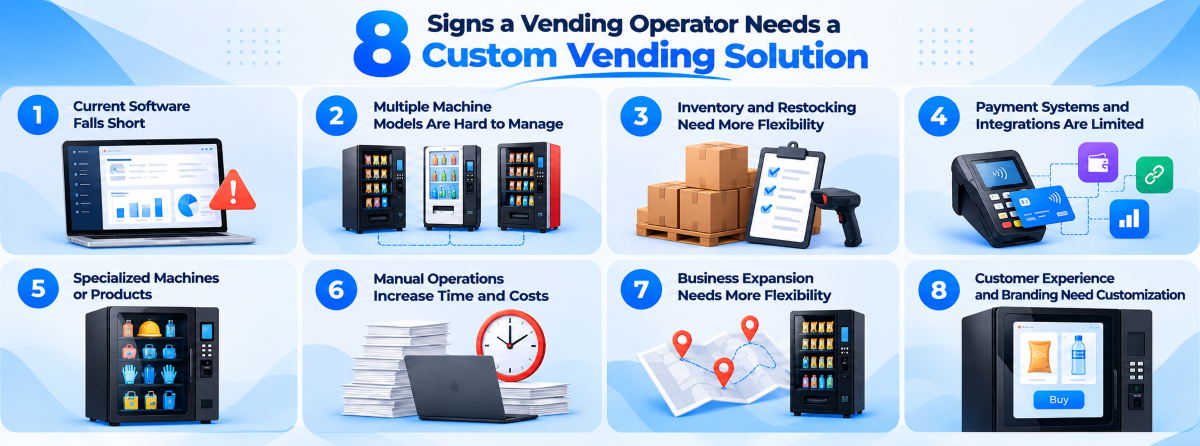
1. Existing Vending Software Cannot Meet Business Requirements
Standard software may lack the flexibility to support specific operational needs.
- Limited Features: Missing essential business functions.
- Restricted Customization: Inflexible pricing, permissions, or approval workflows.
- Disconnected Operations: Dependence on multiple tools for routine tasks.
Custom vending software can address these gaps when existing configurations or upgrades are insufficient.
2. Managing Different Vending Machine Models Becomes Complicated
Operating machines from different manufacturers can create compatibility and management challenges.
- Hardware Compatibility: Different controllers and communication protocols.
- Multiple Dashboards: Separate systems for monitoring machines.
- Disconnected Data: Difficulty centralizing machine information.
Custom integrations can connect compatible machines through a centralized management platform.
3. Inventory and Restocking Processes Need More Flexibility
Complex inventory operations may require capabilities beyond standard tracking tools.
- Warehouse Management: Tracking stock across multiple locations.
- Custom Restocking: Supporting specialized replenishment workflows.
- Product Tracking: Managing expiration dates, returns, and stock transfers.
Custom inventory solutions can simplify these processes and improve stock visibility.
4. Payment Systems and Third‑Party Integrations Are Limited
Some operators require payment methods and business integrations that existing software does not support.
- Payment Limitations: Unsupported gateways, digital wallets, or currencies.
- Integration Gaps: Limited connections with accounting or loyalty systems.
- Manual Reconciliation: Extra work managing disconnected transaction records.
Custom integrations can connect supported payment services and business applications.
5. The Business Uses Specialized Vending Machines or Products
Specialized vending operations may require unique purchasing and dispensing functions.
- Industrial Vending: Employee access and product usage tracking.
- Promotional Vending: QR‑code verification and campaign restrictions.
- Custom Dispensing: Specialized product selection and delivery processes.
A custom vending solution can support these requirements where compatible hardware is available.
6. Manual Operations Are Increasing Time and Costs
Disconnected systems can create repetitive tasks and unnecessary administrative work.
- Manual Data Entry: Repeatedly updating multiple applications.
- Disconnected Reports: Combining sales and inventory records manually.
- Payment Reconciliation: Extra time verifying transactions.
Custom automation and integrations can reduce manual work and improve operational efficiency.
7. Business Expansion Requires More Flexible Management
Growing vending businesses may develop specialized management and reporting requirements.
- Multiple Locations: Managing machines and inventory across regions.
- User Permissions: Assigning access based on employee responsibilities.
- Custom Reporting: Generating reports for different operators or business units.
Customization may be useful when existing platforms cannot support these requirements.
8. Customer Experience and Branding Need Greater Customization
Some businesses require more control over their vending machine interfaces and shopping experiences.
- Branded Interfaces: Custom touchscreen layouts and product displays.
- Personalized Experiences: Loyalty programs and targeted promotions.
- Multilingual Support: Localized languages, currencies, and purchasing interfaces.
Custom vending software can support tailored customer experiences when standard interface options are insufficient.
Custom vs. Off‑the‑Shelf Vending Solutions: Which Is Better?
Both standard and customized vending solutions can help operators manage their businesses. The right choice depends on operational requirements, budget, technical complexity, and available support.
| Factor | Off‑the‑Shelf Vending Software | Custom Vending Solution |
|---|---|---|
| Initial investment | Generally lower | Usually higher for significant development |
| Implementation | Faster with supported equipment | Requires additional planning and testing |
| Features | Predefined with available configurations | Adapted to specific business needs |
| Integrations | Depends on supported providers | Can support additional integrations where technically feasible |
| Flexibility | Limited by platform capabilities | Greater control over specialized workflows |
| Maintenance | Usually handled by the software provider | Depends on implementation and support agreements |
| Scalability | Depends on the provider and system | Can be designed around specific growth requirements |
Standard vending software suits businesses with basic management needs, while custom development addresses requirements existing tools cannot meet.
Alternatively, operators can configure or extend a flexible vending management platform to fill specific gaps without building a new system.
What Features Should a Custom Vending Solution Include?
A custom vending solution should focus on capabilities that solve genuine business problems. The following features are worth evaluating when choosing or planning a system.
Remote Machine Monitoring and Management
Remote monitoring helps operators track machine status, errors, transactions, and alerts without visiting each location. Centralized visibility makes maintenance and troubleshooting more efficient.
Inventory Tracking and Restocking Automation
Inventory software helps track stock levels, manage replenishment, and maintain accurate records. Custom solutions can also support warehouse transfers, restocking assignments, and specialized inventory workflows.
Payment and Business Integrations
Custom vending systems can connect compatible payment gateways, accounting software, and business applications, helping streamline transactions and reduce manual reconciliation while maintaining security.
Sales Analytics and Custom Reporting
Sales analytics helps operators monitor product performance, transactions, and machine activity. Custom dashboards provide reports by location, machine, product, or business requirements.
Route and Restocking Workflow Management
Route management helps organize machine servicing, driver assignments, and inventory replenishment. Custom workflows can support specialized restocking schedules and warehouse operations.
User Roles and Access Control
Role‑based access allows operators to assign permissions to administrators, managers, and route drivers, helping protect business data and streamline responsibilities.
Is Investing in a Custom Vending Solution Worth It?
Custom vending technology can be valuable when it addresses operational limitations that affect business performance. However, operators should evaluate the investment carefully. Three factors are particularly important.
Identify the Operational Value
Identify recurring problems, manual tasks, and their associated costs. Measuring time spent on reporting, inventory, or other processes helps determine potential improvements.
Consider the Total Cost of Ownership
Costs may include software development, integrations, deployment, hosting, and ongoing maintenance. Compare initial and long‑term expenses to ensure the investment fits your budget.
Evaluate Potential Return on Investment
Assess potential savings from automation, reduced manual work, and improved operations. Compare expected benefits with total costs and consider testing the solution on a small scale before full deployment.
Assess Scalability and Future Needs
Choose a solution that can support business growth, additional machines, new payment options, and future integrations without requiring major redevelopment.
How to Choose the Right Custom Vending Solution Provider
Choosing a technology provider requires more than comparing available software features. A suitable provider should understand the operational realities of vending businesses and the technical requirements of connected machines.
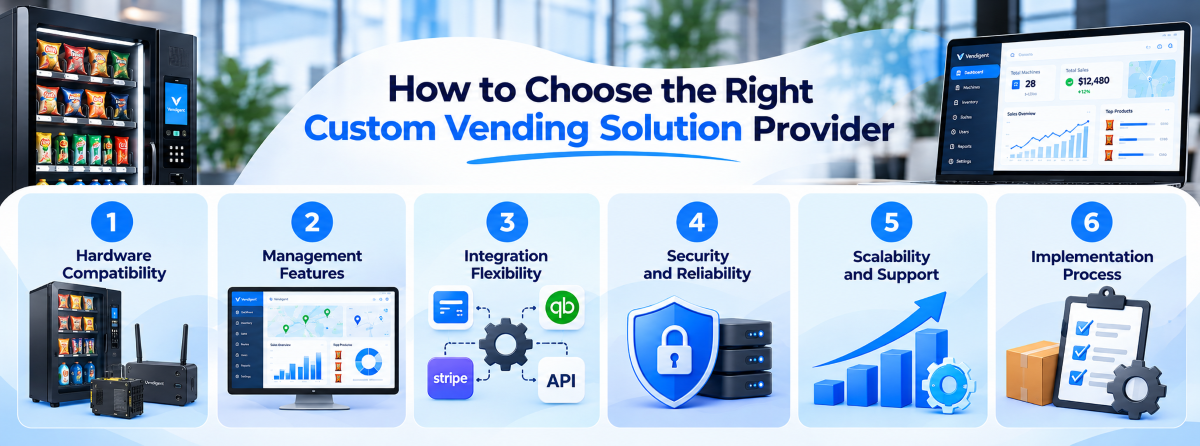
Before making a decision, evaluate the following areas.
- 1Hardware Compatibility: Ensure support for existing machines, controllers, and telemetry devices.
- 2Management Features: Check machine monitoring, inventory, transactions, and reporting.
- 3Integration Flexibility: Verify payment gateway and third‑party software compatibility.
- 4Security and Reliability: Assess data protection, access controls, and system stability.
- 5Scalability and Support: Ensure the platform supports business growth and ongoing maintenance.
- 6Implementation Process: Review testing, onboarding, training, and associated costs.
A suitable solution should address current requirements while remaining practical to operate and maintain.
How Vendigent Helps Vending Operators Manage Their Business
Vendigent is a smart vending management platform that helps operators streamline daily operations through centralized machine monitoring, inventory tracking, sales reporting, and transaction management.
With flexible management tools, Vendigent helps businesses reduce manual work, improve operational visibility, and manage multiple vending machines more efficiently.
Frequently Asked Questions
How Can Vending Operators Manage Multiple Locations Efficiently?
Operators can use Vendigent's vending management software to monitor connected machines, track inventory, and review sales across multiple locations from a centralized dashboard.
What Should Operators Check Before Upgrading Vending Software?
Operators should evaluate machine compatibility, existing features, integration options, operational costs, and scalability to choose software that meets their business needs.
How Can Vending Software Reduce Machine Downtime?
Vending software can provide machine status updates, error alerts, and remote monitoring, helping operators identify issues and schedule maintenance more efficiently.
Why Is Centralized Vending Management Important?
Centralized management simplifies machine monitoring, inventory tracking, and sales reporting. Platforms like Vendigent help operators manage daily operations from one place.
Can Vending Software Help Reduce Restocking Costs?
Yes. Inventory visibility and sales data can help operators prioritize restocking visits, avoid unnecessary trips, and maintain better product availability.
How Does Vendigent Help Vending Businesses Grow?
Vendigent supports business growth through centralized machine management, inventory tracking, sales insights, and operational tools that help operators manage expanding vending operations.
Take Your Vending Business Further with Vendigent
Manage inventory, monitor machines, and track sales with Vendigent's smart vending management software. Streamline daily operations and grow your vending business with ease.